

Version Control Systems (VCS) track changes made to files and provide facility to restore project files and their different versions.
In addition, they often allow several users to cooperate while working on the same files. Today, it is an indispensable tool for all software development processes, whether commercial or personal.
The main functions of a version control system are the following (regardless of whether GIT or SVN is used):
- Stores project files and controls access to them
- Maintains a history of file changes
- It offers the possibility to create and retrieve different versions of a project.
- Represents change documentation
- Allows team members to work simultaneously on the same files and synchronize changes
- Integrates with IC/DC pipelines
1.- IWP
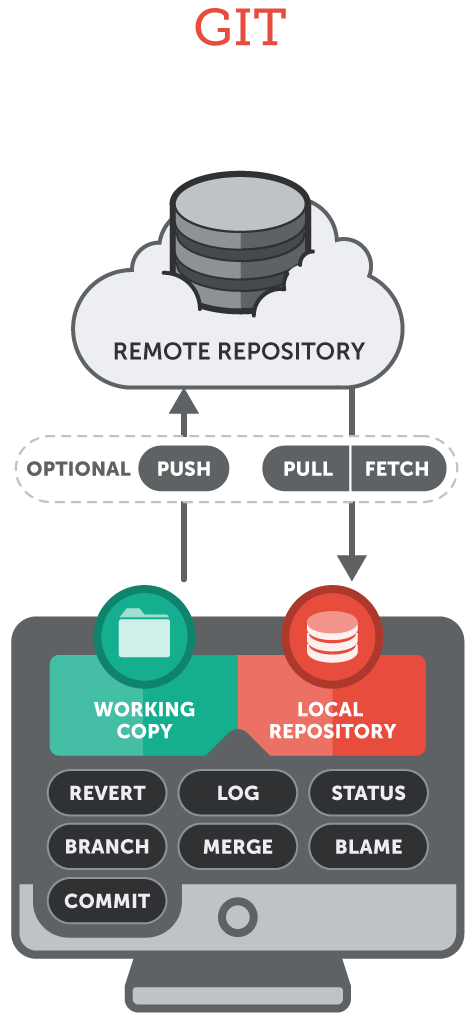
One of the most widely used version control systems is GIT. It is estimated that 72% of all repositories in 2020 used GIT. A repository refers to a storage container for a project's files. GIT is a distributed version control system. It was originally created by Linus Torvalds to support the Linux kernel development process.
GIT is a distributed version control system that provides efficient techniques for working with projects, especially large ones. In addition, it supports distributed workflows and ensures convenient ways of collaborative work.
GIT allows you to work offline, so each team member has a local repository on their own computer. Therefore, they can save changes there without a network connection. While offline, changes can be saved, forked or committed. Later, while connected to an Internet network, they can be pushed to a repository on the server.
2.- SVN (SUBVERSION)
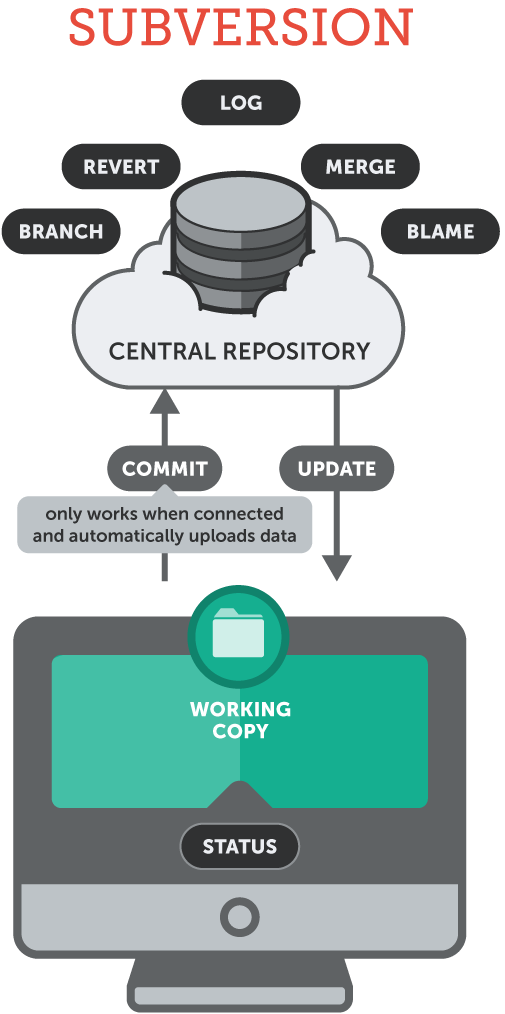
The other very popular version control system is SVN. According to statistics, it is used by 23% of repositories. So, it is much less popular than GIT. Although it is still the second most used version control system on the market. It was created as a successor to an older system called CVS.
First of all, SVN requires a centralized server. Unlike GIT, which can act as both a client and a server. Therefore, SVN is called a centralized version control system.
SVN is designed to work efficiently with binary files. This means that it can be used for document versions, for example, those created with Microsoft Office. Consequently, there are even dedicated tools such as MSOfficeSVN.
Due to the centralized nature of SVN, everything is stored in a single repository on the server. Therefore, access control properties can be easily managed. In addition, backups are simple, as there is only one location to manage.
Finally, SVN is considered easy to learn. Certainly, the learning curve is lower compared to GIT. SVN uses mostly simple and straightforward mechanisms, at least from the user's perspective.
The following table summarizes the main differences between GIT and SVN:
| GIT | SVN |
| Distributed.
Can act as both client and server |
Centralized.
Needs a separate client and server |
| Most of its functions and features are available off-line. | Off-line work is limited |
| Assumes that each user has the same access permissions. | Provides centralized user administration. |
| Easy to learn (higher learning curve than SVN) | Very easy to learn |
| It is used by most developers
(72% of repositories) |
Used by fewer users
(23% of repositories) |
| Limited capabilities to handle large binary files | Efficient handling of large binary files |
So, which one to choose? Basically, as we can see from the comparison, GIT and SVN have some pros and cons. First of all, we should always think about the requirements and needs, and then choose the one that best fits them.
Both version control systems are powerful tools that support the software development process well. Although GIT is more popular due to its advanced branching and collaboration features, as well as a variety of free tools and availability of repository hosting.